
Scrcpy for Android
See and control another Android phone from your phone, by Wi-Fi or USB
Made by zwc456baby · free and open source
This comes straight from Scrcpy for Android’s own GitHub page, and it’s free. Need help installing?
What it looks like
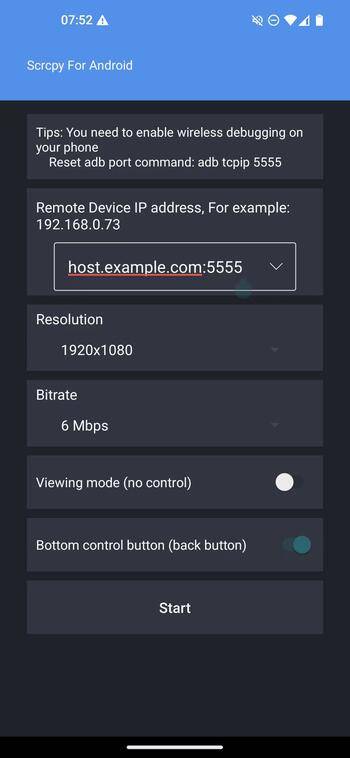
About this app
Scrcpy for Android shows the screen of another Android device on your phone and lets you control it by touch. It is an Android port of the desktop tool Scrcpy, so your phone does the job a computer normally would: it connects to the other device through ADB, streams its display, and sends your taps back.
You can connect over Wi-Fi by typing the other device's IP address, or over a USB cable (USB-C to USB-C, or an OTG adapter). You choose the resolution, bitrate, frame rate and video codec, and the README suggests 1280x720 at 2 Mbps as a good starting point. There is a view-only mode, a switch to forward the other device's audio, and a navbar switch that adds back, home and app-switch buttons for devices that only have hardware ones. Double tap the screen to wake the remote device. A small ADB shell and reboot and power-off commands are built in.
The device you want to mirror must have wireless debugging (ADB over network) or USB debugging switched on in its Developer options, and you need to accept a trust prompt on it the first time. For the Wi-Fi route both devices should be on the same network. The app is in English, Spanish, Japanese and Chinese.
From the app’s home page
- See the codeHow it’s made, every line is public
- Questions & commentsTalk with the people who make it
- Report a problemTell the makers something is broken
- All versionsOlder downloads and what changed
- LicenseThe rules for using and sharing it
More like this
 Quick Tile Settings
Toggle Private DNS and USB debugging from the shade
Quick Tile Settings
Toggle Private DNS and USB debugging from the shade
 Shizuku
Let trusted apps do system-level jobs without rooting
Shizuku
Let trusted apps do system-level jobs without rooting
 bVNC / aRDP Remote Desktop
Control another computer's screen from your phone
bVNC / aRDP Remote Desktop
Control another computer's screen from your phone
 aShell You
Run ADB commands on the phone itself
aShell You
Run ADB commands on the phone itself
 Shizu Call Recorder
Record phone calls on your phone without rooting it
Shizu Call Recorder
Record phone calls on your phone without rooting it
 SkyADB
Manage another Android device from your phone
SkyADB
Manage another Android device from your phone